Drip AR
I. The Vision
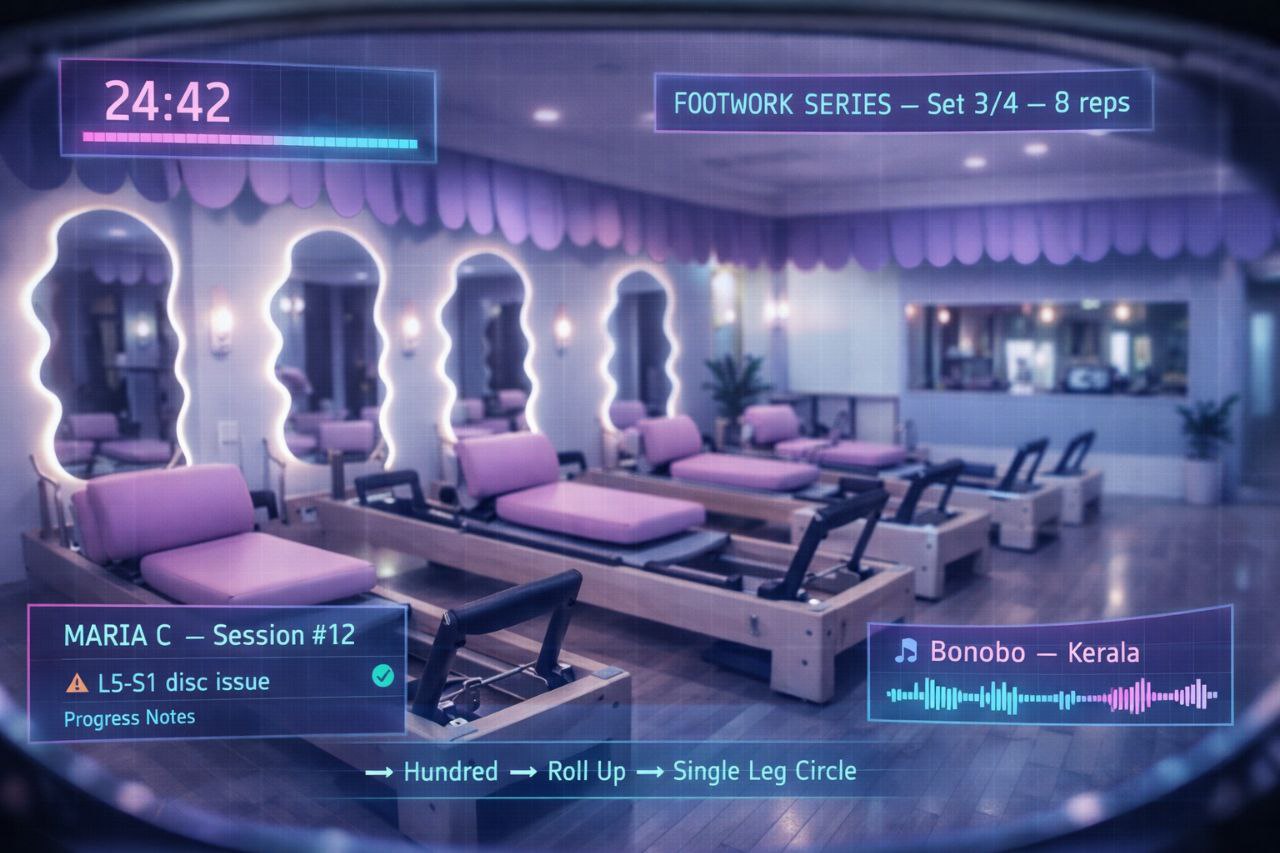
Patty wears a Meta Quest 3 with full color passthrough while teaching every Pilates class. She sees the real world — the studio, the clients, the equipment — in high fidelity. But overlaid on top of it, she sees everything else.
A heads-up display. Client information. Exercise sequences. Timer countdowns. Heart rate zones. Muscle group highlights. Rep counters. Class schedules. Music controls. The entire informational backbone of running a Pilates session, floating in her peripheral vision like a fighter pilot's cockpit.
To the clients, she looks like Trinity from The Matrix. A woman in a purple-and-pink Kuromi headset, moving through Pilates flows with preternatural awareness, calling out corrections before you know you've made them, adjusting the playlist with a gesture, pulling up your session history with a glance.
It will look insane. That's the point. The headset is the brand. The HUD is the superpower. The insanity is the marketing.
II. Why This Works
The Quest 3 Advantage
- Color passthrough — dual 4MP RGB cameras, not grayscale. She sees the real room in full color at 18 PPD resolution. Good enough to read text, see facial expressions, spot misaligned spines.
- Pancake lenses — 40% thinner than Fresnel. The headset doesn't look like a scuba mask.
- Standalone — no PC tether, no cables. She moves freely around the studio.
- WebXR native — the HUD runs in the browser. No app store, no sideloading, no Meta approval. We build it, she loads it.
- Hand tracking — gesture controls without controllers. Wave to dismiss a panel. Pinch to zoom into a client's form analysis.
- Mixed Reality API — the Quest 3's MR mode lets you anchor virtual objects to real-world surfaces. Pin a timer above the reformer. Float client stats next to their station.
The Instructor Advantage
- Information asymmetry — Patty sees data clients can't see. Client names, injury notes, session history, rep counts. She appears omniscient.
- Hands-free reference — exercise sequences, cue sheets, and anatomy overlays visible without looking at a phone or sheet of paper.
- Real-time music/lighting — adjust playlist, dim lights, change ambiance with gestures. The studio responds to her.
- Recording & playback — MR recording captures both the real room and the virtual HUD. Content creation happens during the class, not after.
The Brand Advantage
- Nobody else does this — zero Pilates studios worldwide have an AR-augmented instructor. First mover in a category of one.
- Viral potential — "my Pilates instructor wears a VR headset with cat ears" is a TikTok clip that writes itself.
- Premium positioning — this is not budget fitness. This is the future. Price accordingly.
- Tech-forward identity — Drip becomes known as the studio that treats Pilates like a space mission. Clients come for the novelty, stay for the quality.
III. The HUD
The heads-up display is a WebXR application running in the Quest 3's browser. Built with A-Frame (same framework as the Drip collection game and the drip.xxx XR integration). It floats in Patty's field of view, anchored to her head movement, with key panels pinned to real-world surfaces.
HUD Elements
Conceptual HUD layout — actual implementation will be spatial (floating panels in 3D space), not a flat grid
Advanced HUD Features (Phase 2+)
- Anatomy overlay — highlight target muscle groups on a floating skeleton diagram. "We're working the obliques" → obliques glow magenta.
- Form analysis — Quest 3 hand tracking + body estimation could flag when a client's alignment drifts. "Station 3, lift your chest" — before they feel the strain.
- Timer integration — countdowns anchored above each reformer station. Clients see Patty's calm focus; Patty sees "8... 7... 6..."
- Session logging — automatic tracking of what was taught, duration per exercise, notes per client. The class documents itself.
- Revenue dashboard — tiny corner widget. Today's bookings. Monthly revenue. Outstanding invoices. The business runs in her peripheral vision.
- Cue cards — for new exercises or complex sequences, floating instruction cards she can glance at without breaking flow.
How does Patty interact with the HUD during class? Options:
- Hand gestures — pinch to select, swipe to dismiss. Natural but may confuse clients ("why is she grabbing the air?")
- Eye tracking — Quest 3 has eye tracking. Gaze at a panel + dwell = select. Invisible to clients.
- Voice commands — "next exercise," "show Maria's notes." Could be integrated into teaching patter.
- Pre-programmed sequences — the class is scripted, HUD auto-advances. Patty only intervenes to override.
- Combination — auto-advance + voice override + eye-tracking for quick glances. Most likely answer.
IV. The Kuromi Headset
The Quest 3 must look like Kuromi. Not "inspired by." Not "themed." It must look like Patty strapped Kuromi's face to her head and went to work. The jester hat ears. The skull motif. The pink-on-black palette. The whole thing.
This is not just aesthetic. The headset-as-character transforms a piece of tech into a personality. Clients don't see "VR headset" — they see Patty's signature accessory. It becomes iconic the way a chef's hat is iconic. You can't picture Drip without the Kuromi headset. That's the goal.
Customization Approach
Custom vinyl skin covering the entire Quest 3 exterior. Matte black base with Kuromi's face on the front visor area — eyes, skull mark on forehead. Pink accents along the edges matching the Drip palette.
- Option A — Custom print service: Companies like SopiGuard, DecalGirl, and MightySkins make custom Quest 3 skins. Upload design, they print and cut to exact Quest 3 dimensions. ~€20–40.
- Option B — Local vinyl wrap shop: Any car wrap / signage shop in Iași can print and apply a custom vinyl to the headset. More expensive (~€50–100) but they'll hand-fit it.
- Option C — DIY: Printable vinyl + exacto knife + hair dryer. Cheapest but risky on curved surfaces.
Recommendation: Option A for the flat surfaces (top, sides, front), Option B for the curved facial interface area if needed.
Kuromi's jester hat has two distinct pointed ears/horns — black with pink inner lining, curling outward. These need to be physically attached to the headset strap.
- Option A — 3D printed: Design Kuromi ears in Blender/Tinkercad, 3D print in black PLA/PETG, paint pink inner lining. Attach via clip mechanism to the elite strap. Lightweight (~30g per ear).
- Option B — Fabric/plush: Sew Kuromi ear covers from fabric (black velvet exterior, pink satin lining). Stuff lightly. Attach with velcro or elastic to the strap. Softer look, matches plush aesthetic.
- Option C — Modified cat ear headphone attachment: There are existing "cat ear" Quest accessories on the market. Buy black ones, reshape and modify into Kuromi's pointed jester shape. Fastest path.
- Option D — Commission a cosplayer/prop maker: Etsy/Fiverr prop makers who specialize in Sanrio cosplay. They'll know exactly what Kuromi ears look like. ~€30–80.
Recommendation: Option D (commission) for the first pair — get it perfect. Then Option A (3D print) for replacements and iterations.
The parts that touch Patty's face and wrap around her head.
- Elite strap — replace the stock fabric strap with a rigid elite strap (better weight distribution for extended wear during 55-minute classes). Paint or wrap in Drip purple.
- Facial interface — aftermarket silicone cover in black or dark purple. More hygienic than stock foam (Patty sweats during teaching). Easier to wipe between sessions.
- Head cushion — rear counterweight/cushion in pink to match Drip palette.
Small touches that complete the character.
- Skull charm — Kuromi's signature skull hangs from a small chain attached to the strap. Visible when she turns her head.
- LED accents — optional: small pink LEDs along the strap or ear edges. Visible in the studio's dim lighting. Connects to the neon-green accent aesthetic of Drip.
- Drip logo — small Drip wordmark on the side of the headset or on the strap. The studio branding lives on the device.
- "Patty" nameplate — tiny engraved or vinyl nameplate on the bottom edge. Because it's hers.
Why: Before committing to the full Kuromi build, Patty needs to teach at least 3 classes wearing the unmodified Quest 3. The headset weighs 515g. That's fine for gaming but potentially uncomfortable during dynamic Pilates instruction over 55 minutes of movement.
What happens here: Patty teaches with the stock Quest 3. No HUD yet — just passthrough mode. Tests: weight comfort, field of view adequacy, passthrough quality in studio lighting, client reactions, strap stability during demo movements.
How to continue: If she can teach comfortably for a full class, proceed with customization. If not, investigate: elite strap (redistributes weight), counterweight battery pack (VR Power 2 — adds battery AND acts as counterweight), or reduced wear time (headset on for specific segments only, not entire class).
V. Technical Architecture
The Stack
- Platform: Meta Quest 3 (512GB) — standalone, no PC required
- Runtime: Quest Browser (Chromium-based, WebXR 1.0 compliant)
- Framework: A-Frame 1.6+ with WebXR mixed reality module
- HUD app: Single-page WebXR application hosted on
drip.xxx/hudor1.foo/drip-hud - Data backend: Simple JSON API on vault — client database, exercise library, class schedules
- Local storage: IndexedDB for offline operation (studio WiFi goes down, HUD keeps working from cached data)
- No app store: It's a website. Bookmark it. Open it. You're in mixed reality.
Passthrough + Overlay Architecture
The Quest 3's WebXR API provides immersive-ar session type. In this mode:
- The real world is visible through color passthrough cameras
- Virtual elements (HUD panels, timers, highlights) render on top
- Panels can be head-locked (move with Patty's gaze — like a fighter jet HUD) or world-locked (pinned to a real-world location — like a sticky note on a wall)
- Recommended: Core HUD (class info, timer, current exercise) = head-locked. Client notes = world-locked near their station. Music controls = world-locked near instructor's spot.
Quest 3 passthrough has ~12ms latency. Imperceptible for static activities but may cause slight disconnect during fast head movements. Pilates instruction involves moderate head movement — probably fine, but needs real-world testing. If disorienting, Patty can use a narrower HUD (less overlay = less conflict with passthrough).
Quest 3 battery lasts ~2.2 hours in mixed reality mode. A 55-minute class is fine. Back-to-back classes require charging between. Solution: USB-C power bank in a hip pouch, or the BoboVR battery strap (~€60) which extends life to ~4 hours AND acts as a counterweight for comfort.
VI. Implementation Phases
Patty receives Quest 3. Teaches in pure passthrough mode — no HUD, no customization. Just wearing the headset and seeing the real room through it. Tests comfort, client reactions, passthrough quality, battery life per class.
Why: If passthrough teaching doesn't work at the most basic level (too heavy, too disorienting, clients hate it), the entire plan pivots. No point building a HUD for a headset that lives in a drawer.
What happens: Patty reports: can she teach a full class? Do clients accept it? Is the passthrough quality sufficient in studio lighting?
How to continue: Green light → Phase 2. Problems → troubleshoot (elite strap, shorter wear segments, better lighting). Dealbreaker → headset becomes a studio demo unit for client VR experiences instead.
Build and deploy the first HUD version. Minimal: class timer, current exercise name + cue, next-exercise preview. Head-locked, transparent background, Drip palette colors. Built in A-Frame, hosted on vault. Patty bookmarks the URL and opens it before each class.
While the HUD develops, the headset gets its Kuromi identity. This runs in parallel with Phase 2 — doesn't block HUD development. Commission vinyl skin + ears, order elite strap, apply finishing details.
Add client profiles to the HUD. Each client has: name, session count, injury notes, goals, progress tracking. Patty sees a client card when she glances at a station. The HUD knows who's in class today (from the booking system or manual check-in).
Anatomy overlays. Form analysis hints. Session auto-logging. Revenue widget. Music/lighting gesture controls. The full cyberpunk Pilates instructor fantasy. By this point Patty has been wearing the headset for two months and knows exactly what information she actually uses vs. what looked cool in the plan document.
The Quest 3 can record mixed reality video — real room + virtual overlays composited together. This means Patty can record classes where viewers see both the real studio AND her HUD simultaneously. This is potentially the most valuable content format: a behind-the-eyes view of what the augmented instructor sees. TikTok, Instagram Reels, YouTube. "POV: your Pilates instructor is from the future."
VII. Bill of Materials
| Item | Est. Cost | Priority |
| Meta Quest 3 512GB | €550 | Phase 1 |
| Elite strap (BoboVR M3 Pro or similar) | €50–70 | Phase 1 |
| Silicone facial interface | €15–25 | Phase 1 |
| Custom Kuromi vinyl skin (print service) | €20–40 | Phase 3 |
| Commissioned Kuromi ears (Etsy/Fiverr) | €30–80 | Phase 3 |
| Skull charm + chain | €5–15 | Phase 3 |
| LED accent strip (optional) | €10–20 | Phase 3 |
| BoboVR battery strap (extended sessions) | €60 | If needed |
| WebXR HUD development | €0 | Phase 2 |
| TOTAL (estimated) | €740–860 |
HUD development is €0 because Walter builds it. The most expensive developer on the team charges in electricity and Anthropic API credits.
VIII. The Insanity Factor
Let's be explicit about what this looks like from the outside:
A woman in a black-and-pink headset with jester ears walks into a room of reformer machines. The headset has a skull dangling from it. She moves through the studio like she can see things you can't — because she can. She knows your name before you introduce yourself. She knows about your bad knee. She adjusts the music without touching anything. She calls out rep counts to the second. A pink LED strip on her headset pulses softly in the studio's ambient lighting.
The clients will either think this is the coolest thing they've ever seen or they'll be slightly terrified. Either way, they'll tell everyone they know. And that's the marketing plan.
"My Pilates instructor is a cyborg cat" is the kind of sentence that generates word-of-mouth advertising money cannot buy.
IX. Patty's Comment
"idk why i feel this will be totally done and dusted by 2028" — p, March 17, 2026
🇨🇴